
Choosing the right font for coding can make a developer’s workspace feel more comfortable, organized, and visually distinctive. Typography plays an important role in code editors because developers spend long periods reading variables, functions, operators, numbers, and other programming characters. A well-structured typeface can help separate characters clearly and make code easier to scan. One easy way to find a suitable font is to look for font recommendation for coding options.
A useful font recommendation for coding should consider more than visual style. Monospaced fonts are traditionally popular font recommendation for coding because each character occupies the same amount of horizontal space. This consistent spacing helps code align neatly and makes indentation, tables, and blocks of code easier to inspect.
However, coding typography does not have to look completely ordinary. Developers working on creative coding projects, game development, retro interfaces, websites, or technology branding may want a more distinctive font for code-inspired graphics and visual projects. Pixel fonts, rounded monospaced styles, and hand-drawn monospaced fonts can all provide different creative directions.
In this guide, we explore ten font recommendation for coding from Craft Supply Co that can inspire coding environments, developer-themed graphics, programming tutorials, technology branding, game interfaces, and other projects connected to coding.
What Makes a Good Font for Coding?
When choosing a font for actual code, readability should come first. Developers frequently need to distinguish characters that look similar, such as the number zero and capital letter O, or lowercase l, uppercase I, and the number one.
A useful coding font should ideally provide:
- Clear character shapes: Similar-looking characters should remain easy to distinguish.
- Consistent spacing: Monospaced designs can keep code visually aligned.
- Comfortable proportions: Letters should remain readable during long coding sessions.
- Good punctuation: Brackets, parentheses, quotation marks, operators, and symbols need clear shapes.
- Useful weight options: Different weights can help with editor themes and visual hierarchy.
- Strong screen presence: The font should remain clear at the size you normally use in your editor.
It is also important to distinguish between fonts for actual coding interfaces and fonts for coding-themed design. A highly decorative font may look excellent in a programming poster or developer-themed website graphic but may not provide the clarity required for several hours of code reading.
Font Recommendation for Coding
The following font recommendations cover several typography directions. Some are monospaced or mono-inspired and can be considered for coding-related applications, while others are better suited to developer branding, programming graphics, game interfaces, and technology-focused visual projects.
1. CS Norman Mono Drawn Font

CS Norman Mono Drawn Font combines a monospaced concept with a more expressive drawn character. This makes it an interesting choice when you want coding typography to feel less conventional and more creative.
Its mono-inspired structure can be useful for developer-themed graphics, coding posters, programming tutorials, tech branding, and creative portfolio projects. The drawn character can also help a developer website feel more personal than one built entirely around standard system typography.
For an actual code editor, test the font carefully at your preferred size before adopting it as your everyday coding typeface. For visual design, however, its distinctive character can make code-inspired headlines much more memorable.
2. CS Goals Pixel Font
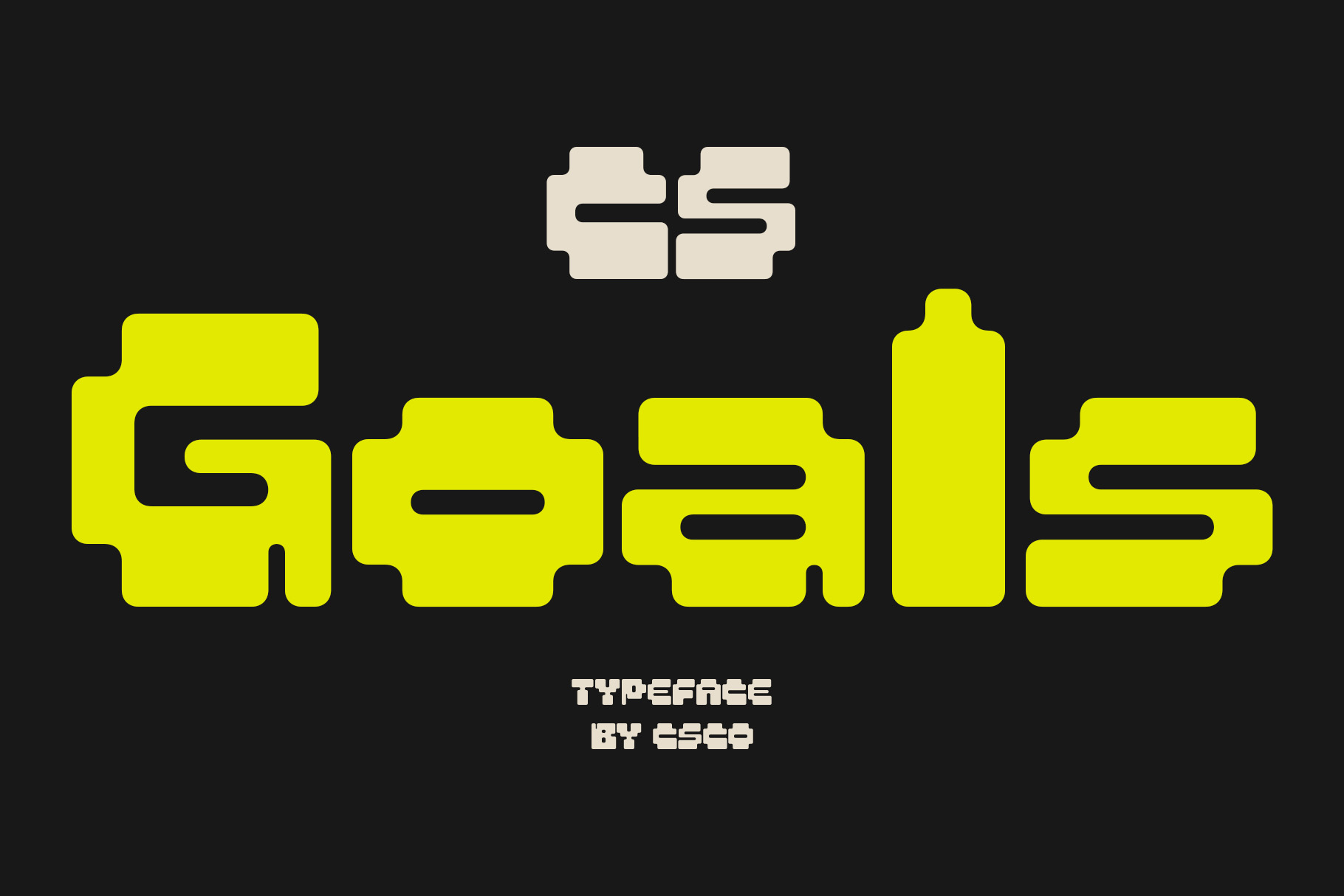
Pixel fonts naturally connect coding with early computer graphics, games, and digital interfaces. CS Goals Pixel Font can bring that aesthetic to developer-themed designs and technology projects.
Use it for game development graphics, coding tutorials, retro websites, developer event posters, programming merchandise, and digital artwork. Its pixel character can help establish an immediate connection with computer culture.
For body code, always prioritize clarity over style. For headings and visual elements surrounding code, a pixel font can provide a strong thematic accent.
3. CS Golem Pixel Font

CS Golem Pixel Font provides another pixel-based direction for coding and technology projects. Pixel typography can give a design a nostalgic computer aesthetic while also working well with gaming and digital artwork.
Consider it for developer portfolios, programming event graphics, game interfaces, coding community artwork, technology posters, and retro-inspired websites.
Pair the pixel typography with a clean font for longer text. This creates contrast while allowing the pixel lettering to establish the project’s visual identity.
4. CS Caleb Mono Drawn Font

CS Caleb Mono Drawn Font offers a creative interpretation of monospaced typography. Its drawn character can make a technical design feel more approachable and human.
This makes it useful for developer portfolios, creative coding projects, programming education graphics, technical presentations, and technology branding. It can also work well when you want to combine a coding aesthetic with a handmade visual style.
For actual programming, examine the punctuation and character distinctions carefully before making it your primary editor font.
5. CS Strive Mono Drawn

CS Strive Mono Drawn provides another mono-inspired option for developers and designers who want something more expressive than a conventional coding typeface.
The monospaced concept can complement code-themed layouts, while the drawn treatment introduces personality. Use it for programming posters, developer merchandise, portfolio graphics, technical illustrations, and creative coding projects.
It can also work nicely for short code snippets displayed as visual elements rather than long blocks of production code.
6. CS Caleb Mono Monospaced Font

CS Caleb Mono Monospaced Font is one of the more directly relevant choices for coding-related typography because its monospaced structure fits the visual conventions commonly associated with programming.
Monospaced fonts give every character the same horizontal width, which can help maintain alignment across lines of code. This structure also makes the font useful for terminal-inspired layouts, code screenshots, developer interfaces, and programming graphics.
Before using it as your everyday coding font, test common programming characters such as brackets, braces, parentheses, quotation marks, zero, uppercase O, lowercase l, uppercase I, and the number one.
7. CS Arcel Mono Rounded
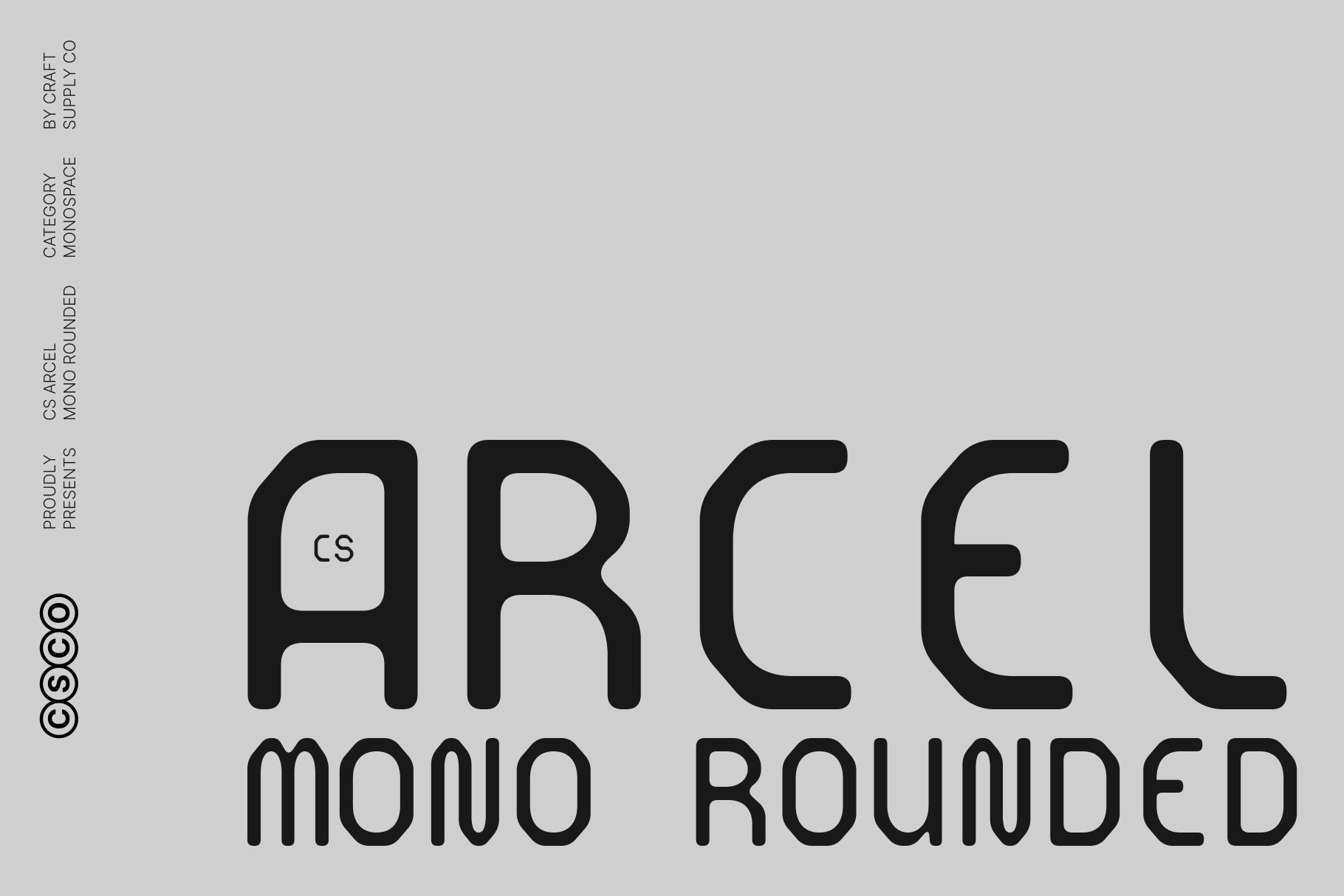
CS Arcel Mono Rounded combines monospaced structure with softer, rounded letterforms. This can provide a friendlier alternative to highly technical-looking coding fonts.
Use it for developer websites, coding education platforms, programming communities, SaaS branding, app interfaces, and technology presentations. The rounded treatment can help make technical content feel more approachable.
It can be especially useful when your project needs to communicate technology without looking overly industrial or rigid.
8. CS Gayle Mono Pixel

CS Gayle Mono Pixel combines two visual ideas closely associated with digital culture: monospaced typography and pixel construction. This makes it a natural candidate for retro computing, gaming, and experimental technology graphics.
Consider it for game interfaces, developer event artwork, coding posters, digital products, retro websites, and programming-related merchandise.
The pixel structure can become a strong visual feature, so use it for short headings, labels, or display text when you want the digital character to remain prominent.
9. CS Goals Drawn
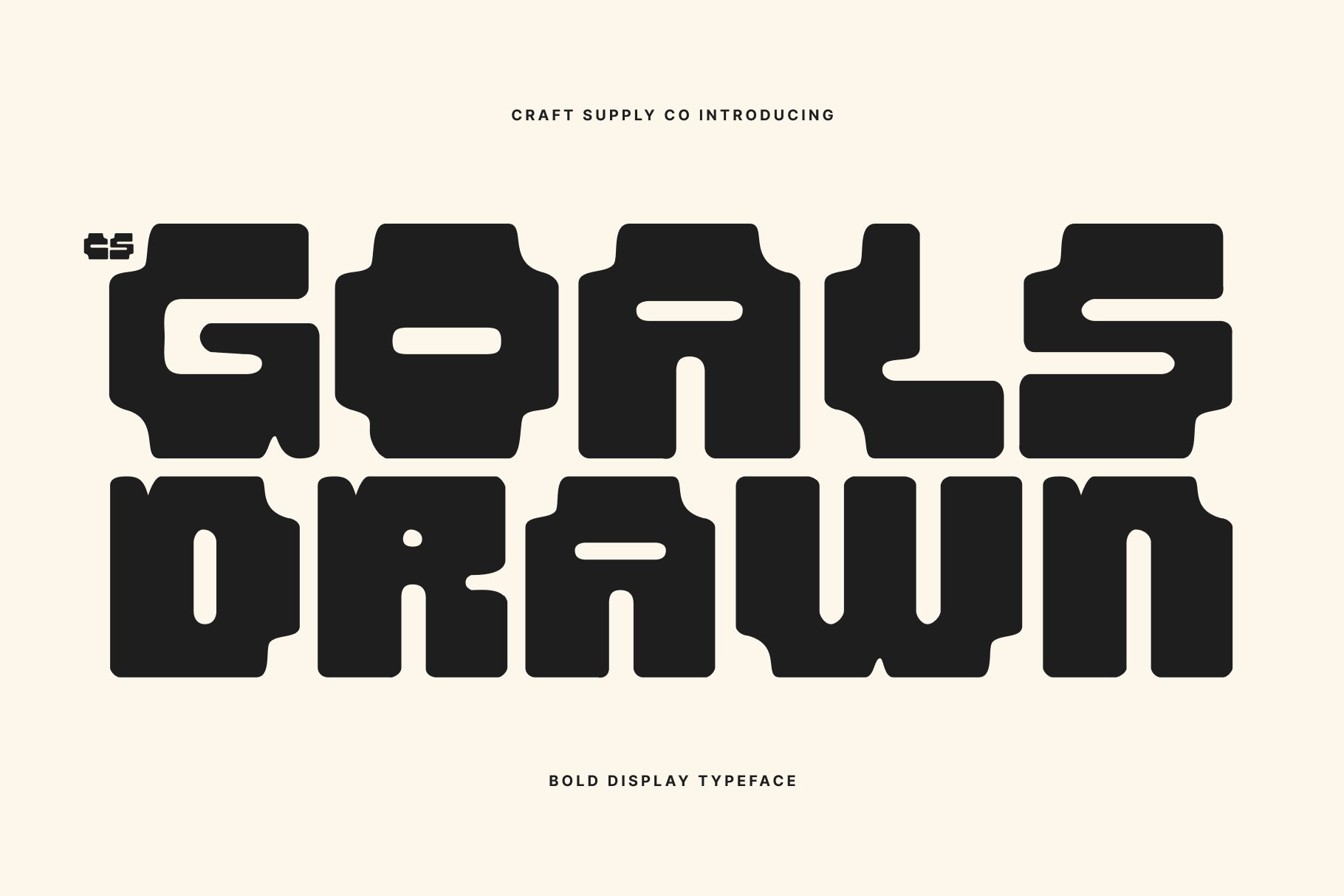
CS Goals Drawn takes coding typography in a more illustrative direction. Its drawn appearance can work well when a technical project needs a creative or informal personality.
Use it for coding workshops, developer community graphics, programming tutorials, technology blog artwork, creative coding projects, and educational materials.
It can also work as a display font around code blocks. For example, use it for a tutorial heading while keeping the actual code in a highly readable monospaced font.
10. CS Robert Mono Drawn Font

CS Robert Mono Drawn Font provides another creative monospaced direction for developer-oriented projects. Its drawn quality gives technical typography a more expressive character while retaining the visual idea of fixed-width lettering.
Try it for coding portfolios, programming posters, developer merchandise, technology presentations, creative websites, and code-inspired editorial designs.
Its distinctive personality can be particularly useful when your goal is to communicate both technical knowledge and creative identity.
Why Are Monospaced Fonts Popular for Coding?
Monospaced fonts have a long association with programming because each character occupies the same amount of horizontal space. This consistency makes lines of code visually predictable and helps developers follow indentation and alignment.
For example, when characters have consistent widths, a block of code can maintain a clear vertical structure. This can make certain patterns easier to scan, particularly when working with indentation, columns, command-line output, or ASCII-based layouts.
However, monospaced typography alone does not guarantee that a font will be comfortable for coding. Character design matters just as much. Always test the font with real code before using it as your primary editor typeface.
Font Recommendation for Coding Projects and Developer Branding
If you are designing a website, portfolio, presentation, poster, or social media graphic for developers, you have more freedom than you would have inside a code editor.
You can use a pixel font such as CS Goals Pixel or CS Golem Pixel to create a retro technology atmosphere. CS Arcel Mono Rounded can create a friendlier modern developer identity, while CS Caleb Mono and CS Robert Mono can reinforce the traditional coding aesthetic.
The important thing is to establish a clear hierarchy. Use your distinctive font for headings, labels, or visual accents, then use a highly readable font for paragraphs and technical information.
How to Choose a Coding Font
Start by deciding whether you need a font for actual code editing or for a coding-themed design. This distinction can significantly change your choice.
For actual coding, focus on character recognition, spacing, punctuation, and long-term readability. Open your code editor and test a real project. Look at variables, numbers, brackets, comments, operators, and indentation rather than judging the font from a sample alphabet.
For coding-related graphics, you can prioritize personality. Pixel, drawn, and rounded mono styles can make a technology project feel more distinctive while still communicating a connection to programming.
Characters to Test Before Using a Coding Font
Before choosing a font for programming, test characters that commonly cause confusion. This simple step can reveal whether a typeface works well for your particular workflow.
- 0 and O: Make sure zero and capital O are easy to distinguish.
- 1, I, and l: These characters should have noticeably different forms.
- Brackets: Check parentheses, square brackets, and curly braces.
- Quotation marks: Inspect single and double quotation marks.
- Operators: Check characters such as +, -, *, /, =, <, and >.
- Colon and semicolon: Make sure the dots remain clear at smaller sizes.
- Backslash: This character appears in many programming languages and file paths.
These details matter because developers can encounter them hundreds or thousands of times during a typical work session.
Font Pairing for Coding Websites
A coding website does not need to use the same font everywhere. In fact, combining different typography styles can create a clearer visual hierarchy.
- Mono display + sans serif: Use a monospaced style for technical headings and a clean sans serif for general content.
- Pixel font + modern sans serif: Create a retro-digital accent without sacrificing paragraph readability.
- Rounded mono + clean body font: Give a technology brand a friendlier personality.
- Drawn mono + traditional mono: Use the expressive font for headings and a practical coding font for code blocks.
Keep the number of fonts under control. A consistent typographic system will make even an experimental developer website feel professional.
Common Mistakes When Choosing a Coding Font
One common mistake is selecting a coding font based only on its appearance. A font can look excellent in a screenshot but become uncomfortable after several hours of use.
Another mistake is ignoring punctuation. Developers rely heavily on symbols, so the font needs to display these characters clearly.
It is also important to test different font sizes. A typeface may look excellent at 18 pixels but become difficult to read at 12 pixels. Test the font at the size you actually plan to use.
Finally, remember that a font designed for coding-themed artwork does not necessarily make an ideal programming editor font. Decorative pixel and drawn fonts can work wonderfully in visual projects while remaining less suitable for long coding sessions.
The right font recommendation for coding depends on how you plan to use it. If you need a font for actual programming, focus on character distinction, monospaced spacing, punctuation clarity, and comfortable long-term reading. If you need typography for a developer brand, coding poster, portfolio, or technology-themed design, you can explore more expressive options.
CS Caleb Mono Monospaced, CS Arcel Mono Rounded, CS Norman Mono Drawn, CS Caleb Mono Drawn, CS Strive Mono Drawn, and CS Robert Mono Drawn provide different mono-inspired directions. For a retro digital aesthetic, CS Goals Pixel, CS Golem Pixel, and CS Gayle Mono Pixel can introduce strong pixel character, while CS Goals Drawn provides a more expressive alternative.
Before settling on a font, test it with real code and pay attention to the small details. Check similar characters, punctuation, spacing, numbers, and symbols. For design projects, test the font within the complete visual system rather than evaluating it in isolation.
Good coding typography should make technical content easier to understand while giving your project an appropriate visual personality. Whether you are building a developer portfolio, designing a programming tutorial, creating a technology brand, or customizing a coding workspace, thoughtful font selection can make the experience clearer and more distinctive.
For more creative typography and font inspiration, explore Craft Supply Co. You can also discover more design and typography projects from Craft Supply Co on Behance.